admin
admin
Data loss presents a crisis, not merely a hindrance, for business or personal affairs. With missing files costing lives, projects, and cash-from memories of a family portrait to business-critical documents – the loss could be anything. Studies suggest that 30% of users’ experience data loss at least once a year, often due to accidental deletions, hardware failures, or malware attacks.
While backups are ideal, they’re not always up-to-date or accessible. This is exactly when a data-recovery tool considered indispensable by any standard with a high recovery rate comes in handy. RecoveryFox AI, a cutting-edge solution designed to retrieve lost files with a remarkable 98% success rate.
In this article, we will explore how this software stands out in a crowded market, its unique features, and why it could be the ultimate solution for your digital assets.
Getting to Know RecoveryFox AI
RecoveryFox AI is an AI-powered data recovery application developed by WonderFox Soft capable of adapting to file structures and storage patterns, thus enabling it to locate and recover data in even the most complex situations. The software runs on Windows OS, supporting various storage devices, such as hard drives, SSDs, USB drives, and memory cards.
The fundamental mission is simple: ensuring data recovery is secure, smart, and accessible for all.
Key Features of RecoveryFox AI
- AI-Driven Precision
At its core, RecoveryFox AI employs adaptive algorithms that learn from hundreds of data recovery scenarios. This enables it to identify fragmented or corrupted files that other tools might overlook.
- Broad File Type Support
Whether it’s documents, videos, emails, or application files, the software recognizes over 500 formats, ensuring comprehensive recovery.
- Real-Time Previews
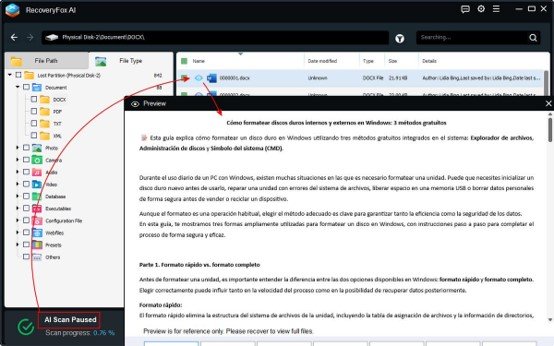
Before restoring files, users can preview recoverable items, a feature that saves time and avoids cluttering systems with unnecessary data.
- Speedy Scans
Leveraging optimized scanning modes (Quick Scan for recent deletions and AI Scan for formatted drives), the tool balances speed and thoroughness.
- Non-Destructive Recovery Process
RecoveryFox AI operates in read-only mode, guaranteeing that your original data remains untouched during recovery.
How to Use RecoveryFox AI: A Beginner-Friendly Guide
Even with no technical expertise, users can navigate RecoveryFox AI in 3 straightforward steps:
Step 1. Download and install.
Visit the official website, download the installation, and install the lightweight application on your Windows PC.
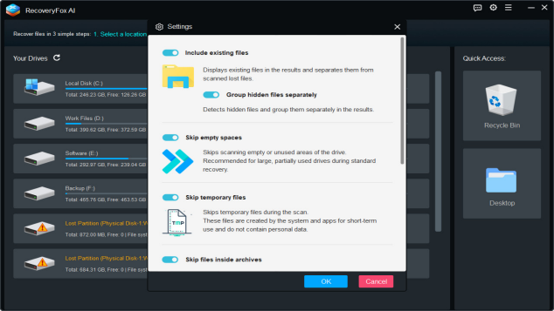
Step 2: Select a location and start scanning.
The intuitive dashboard displays connected storage devices, selects the target drive and begins scanning.
- Quick Scan: Ideal for recently deleted files in the Recycle Bin and Desktop.
- AI Scan: For formatted drives or severe corruption.
There is no need to manually select it, the quick scan is followed by an AI scan (you will be prompted on the screen). But you can manually pause it at any time.
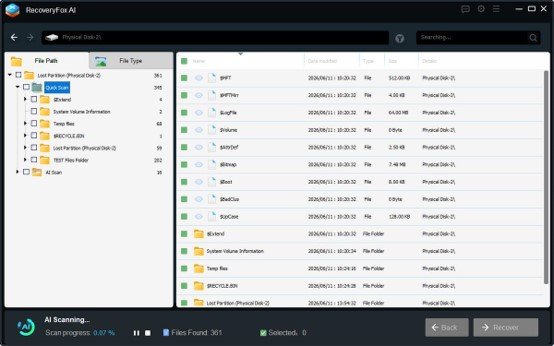
Step 3: Preview and recover.
Browse recovered files using filters (date, type, size) and preview them. Choose a safe destination (avoid the original drive to prevent overwriting) and select the items to restore.
The time the whole process takes depends on the number of files you have, the size of the disk and the hardware configuration.
Who Needs RecoveryFox AI?
This tool caters to a diverse audience:
- Everyday Users: Accidentally deleted vacation photos? RecoveryFox AI can help.
- Professionals: Recover unsaved project files or corrupted design drafts.
- Businesses: Retrieve lost client databases or financial records swiftly.
- Students: Rescue essays or research papers from a crashed laptop.
Common use cases include recovering data after system crashes, ransomware attacks, or failed software updates.
Pricing Options for All Needs
RecoveryFox AI offers tiered subscriptions:
- Weekly Subscription: $49.95 (ideal for urgent, one-time recovery).
- Monthly Subscription: $59.95 (for frequent users).
- Annual Subscription: $69.95 (for professionals, businesses, or anyone who prioritizes long-term data security).
- Lifetime Subscription: $99.95 (unlimited access to updates and features).

Pros and Cons
Pros
- Industry-leading 98% recovery rate.
- User-friendly interface for non-technical audiences.
- Affordable pricing compared to competitors.
Cons
- AI Scan can take longer than its “Quick Scans”.
- macOS version unavailable (Windows-only).
Summary
Data loss is inevitable, but permanent loss doesn’t have to be. RecoveryFox AI is the amalgamation of AI-enabled workflows and simplicity, thus combining power with user-friendliness. While it has minor limitations, its success rate, ease of use, and flexible pricing make it a top contender in data recovery software. Whether you’re a casual user or a business, this tool offers a reliable safety net for your digital life.
Do not let an accident erase memories or work, instead, enable RecoveryFox AI to work through each lost file and turn failure into hope!